

Flexible Member Billing
GearConnect’s flexible member billing system automatically adjusts your charges based on when members join or leave your team. This ensures you only pay for the time members are actually on your team and you aren’t charged for unused time.
This is the default billing method for Teams, ideal for those who frequently add or remove members, such as freelancers or contractors and are more comfortable with fluctuating monthly or yearly costs based on actual usage.
If you prefer predictable pricing, we also offer fixed member billing if you’d rather have consistent monthly/yearly charges without proration. For details, see the Fixed Member Billing page.
How It Works
- Only paid members (Owner, Admin and Member roles) affect billing; Billing Managers and Guests do not incur charges.
- Active time is calculated down to the second, based on how long a member is in an active paid role.
- A user is considered active from the moment they accept an invite or are changed to a paid role, until they are removed from the team or are changed to a non-paid role.
- Pending invites do not incur charges until accepted.
- New charges are billed as soon as a member is counted as active (invite acceptance or role change).
- Credits are applied to your account when a member is either no longer on your team, or has been changed to a non-paid role.
- Credits automatically apply to your next invoice, reducing the total amount due.
This system is perfect for adding freelancers and contractors for a limited time without paying for a full month or year. Pay just for the time they are actually on your team!
Add Members
When a new paid member is added to your team through invite acceptance or role change to a paid role from a non-paid role, the system immediately charges for the remaining time in the current billing cycle.
Examples
Numbers are rounded for simplicity.
Example 1: Adding a member 15 days into a 30-day monthly cycle
- Full monthly cost: $30 per paid member.
- Days remaining: 15.
- Immediate charge: $15 (50% of monthly cost).
- Next billing cycle: Full $30 per paid member charge.
Example 2: Adding a member 1 month before yearly renewal
- Full yearly cost: $300 per paid member.
- Time remaining: 1 out of 12 months.
- Immediate charge: $25 (1/12 of yearly cost).
- Next billing cycle: Full $300 per paid member charge.
Remove Members
When a paid member is removed or changed to a non-paid role from a paid role, the system credits back the unused time for that paid member.
Examples
Numbers are rounded for simplicity.
Example 1: Removing a member 20 days into a 30-day monthly cycle
- Full monthly cost: $30 per paid member.
- Days remaining: 10.
- Credit issued: $10 (33% of monthly cost).
- Credit appears on next invoice, reducing total amount due.
Example 2: Changing Admin to Guest role mid-year
- Full yearly cost: $300 per paid member.
- Time remaining: 6 out of 12 months.
- Credit issued: $150 (6/12 of yearly cost).
- Credit reduces next invoice total, reducing the total amount due.
Combination Examples
To help illustrate how adding and removing members works together, here are some combination examples. Numbers are rounded for simplicity.
Example 1: Mid-cycle remove, then add
- Full monthly cost: $30 per paid member.
- Day 15: Remove a paid member with 15 days left in the cycle.
- Credit issued: $15 (50% of monthly cost).
- Day 22: Add a new paid member with 8 days left in the cycle.
- Immediate charge: $8 (25% of monthly cost).
- $8 of your existing credit is used to cover this charge, resulting in a $0 immediate charge.
- The remaining $7 credit is applied to your next invoice.
Example 2: Early-cycle remove, later add
- Full monthly cost: $30 per paid member.
- Day 1: Remove a paid member at the start of the billing cycle.
- Credit issued: $30 (100% of monthly cost).
- Day 15: Add a new paid member with 15 days left in the cycle.
- Immediate charge: $15 (50% of monthly cost).
- $15 of your existing credit is used to cover this charge, resulting in a $0 immediate charge.
- The remaining $15 credit is applied to your next invoice.
Example 3: Add a member then immediately removing them
- Full monthly cost: $30 per paid member.
- Day 10: Add a new paid member with 20 days left in the cycle.
- Immediate charge: $20 (67% of monthly cost).
- Day 10: Remove the same paid member with 20 days left in the cycle.
- Credit issued: $20 (67% of monthly cost).
- The $20 credit is applied to your next invoice, essentially resulting in no net cost for adding and removing this member.
Billing Changes
Role Change
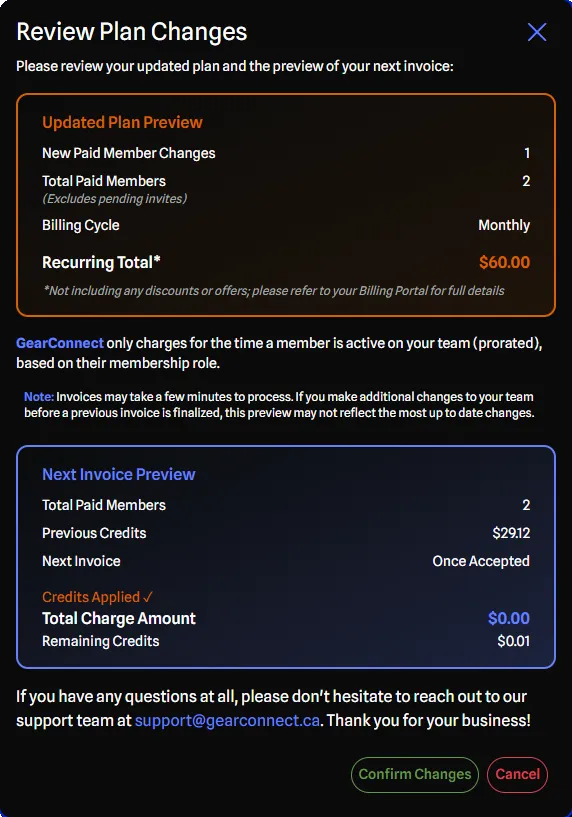
The Review Plan Changes dialog appears when you change an existing member to or from a paid role. The confirmation dialog displays the following details:
- Updated Plan Preview
- Shows how many paid members you are changing
- Shows the total paid members (including pending invites)
- Shows your billing cycle and the new total cost (excluding discounts or credits)
- Represents what you can expect to start paying on a monthly or yearly basis
- Next Invoice Preview
- Shows the total paid members for the next invoice
- Shows when you can expect your next invoice
- Shows the total expected charge
- Shows any credits before and after the change, if applicable
- Note: This section may not appear if your Team is on a trial and you have not added a credit card, as you will not have an upcoming invoice yet
For role changes, the charge or credit is immediate upon confirmation.
Inviting Members
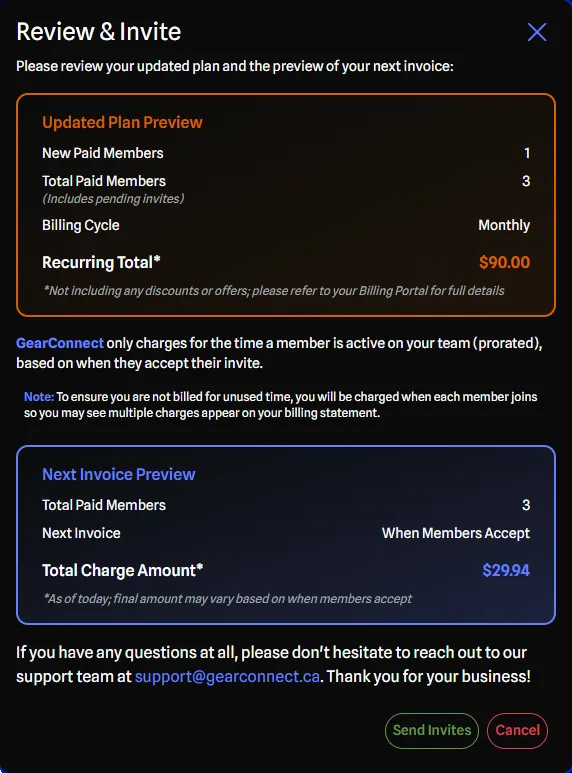
The Review & Invite dialog appears when you invite members with paid roles. The confirmation dialog displays the following details:
- Updated Plan Preview
- Shows how many new paid members you are adding
- Shows the total paid members (including pending invites)
- Shows your billing cycle and the new total cost (excluding discounts or credits)
- Represents what you can expect to start paying on a monthly or yearly basis
- Next Invoice Preview
- Shows the total paid members for the next invoice
- Shows when you can expect your next invoice
- Shows the total expected charge
- Shows any credits before and after the change, if applicable
- Note: This section may not appear if your Team is on a trial and you have not added a credit card, as you will not have an upcoming invoice yet
For invitations, the charge occurs when each invite is accepted, not when it's sent. Pending invites do not incur charges.
Credits
When you remove paid members or change them to non-paid roles, credits are applied to your Team account.
How They Work
- Credits are stored on your Team account.
- They are automatically applied to future invoices.
- Credits appear as line items on invoices.
- Credits never expire as long as the subscription is active.
- Credits are non-refundable (applied to future charges only).
View Credits
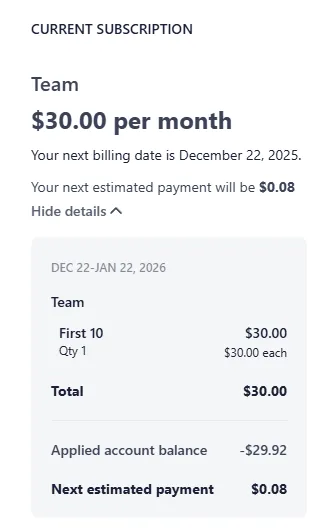
You can view your credits:
- In Stripe’s billing portal (accessible from the Subscription Tab).
- In the Review Plan Changes Dialog when adding/removing members.
FAQ
Q: When am I charged for sending an invite?
A: You’re charged when the invited member accepts the invite, not when you send it. Pending invites don’t incur charges.
Q: Can I batch member changes to avoid multiple charges?
A: No, you’re charged each time a member accepts their invite, even with bulk invites. Each acceptance triggers a separate charge. If you prefer predictable, lump sum pricing instead, you can learn more about our Fixed Member Billing option.
Q: What happens if I add and remove the same member multiple times?
A: Each change triggers a proration. The first time the member is added you will be charged. On the first removal, a credit is issued. Subsequent additions and removals will continue to trigger charges and credits, using the credit balance as applicable. This results in net-zero invoices, and when done multiple times, will lead to several $0 invoices being generated.
In short - you are only charged once per billing cycle and then credited back for the total unused time.
Q: Can I disable proration and have predictable billing?
A: Yes, learn more about our Fixed Member Billing option for predictable monthly/yearly charges without proration.
Q: What happens to my credits if I cancel my subscription?
A: Credits are non-refundable and only apply to future invoices while the subscription is active, for the team’s subscription to which they were issued. If you cancel your subscription, any unused credits will be forfeited but exceptions may be granted on a case-by-case basis by contacting support.
Q: How precise is the proration calculation?
A: Proration is calculated down to the second based on exact time of change within your billing cycle.
Any other questions please don’t hesitate to reach out to our support team at [email protected].