

Hover Cards
When you hover over a port or connection in the drawing, a hover card will appear in the top right of the drawing, right underneath the Draw Toolbar.
This hover card will show you all the details of the port or connection. A coloured accent strip at the top of the card reflects the colour of the hovered port or connection.
Port Hover Card
Section titled “Port Hover Card”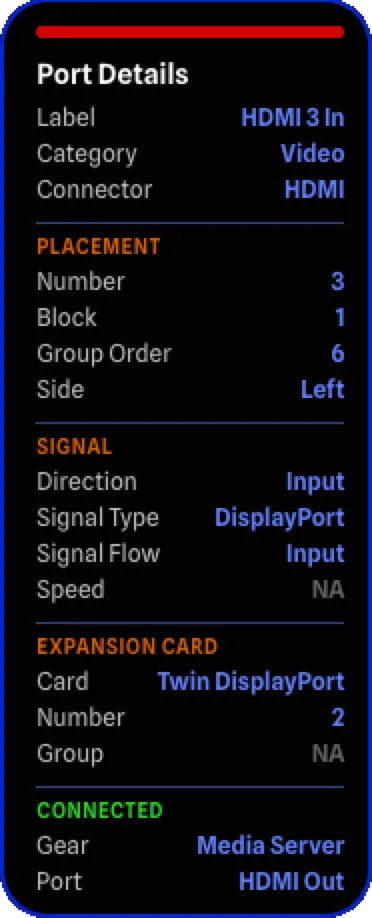
The port hover card shows details organized into sections. To learn more about the various port options, see Ports. Fields with no value (e.g. “NA”, “Default”, “Auto”) will appear greyed out.
General
Section titled “General”- Label: The label of the port.
- Category: The category of the port.
- Connector: The connector type of the port.
Placement
Section titled “Placement”- Number: The sort number of the port.
- Block: The block the port belongs to.
- Group Order: The custom group sort order, or “Default” when not set. Learn more about custom group ordering here.
- Side: The current side override setting for the port group. Learn more about side overrides here.
Signal
Section titled “Signal”- Direction: The direction of the port.
- Signal Type: The signal type of the port.
- Signal Flow: The signal flow of the port.
- Speed: The speed of the port.
Expansion Card
Section titled “Expansion Card”- Card: The expansion card model, if applicable.
- Number: The expansion card instance number, if applicable.
- Group: The expansion card group/slot on the parent element, if applicable.
Connected
Section titled “Connected”Shows the gear and port on the other end of the connection, or “NA” when the port is not connected. The section title turns green when the port is connected.
- Gear: The name of the connected gear item.
- Port: The label of the connected port.
Connection Hover Card
Section titled “Connection Hover Card”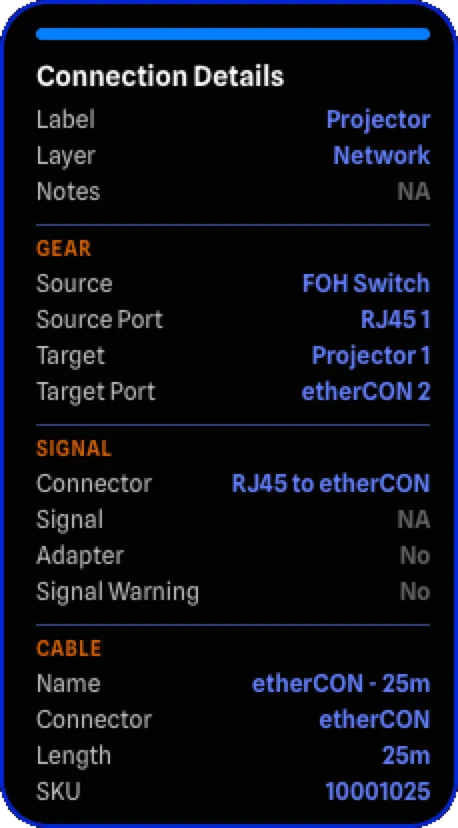
The connection hover card shows details organized into sections. To learn more about connections, see Connections. Fields with no value (e.g. “NA”, “No”) will appear greyed out.
General
Section titled “General”- Label: The label of the connection.
- Layer: The current layer of the connection. Learn more about layers here.
- Notes: Any notes that have been added to the connection.
- Source: The source gear item of the connection.
- Source Port: The label of the source port.
- Target: The target gear item of the connection.
- Target Port: The label of the target port.
Signal
Section titled “Signal”- Connector: The connector type of the connected ports. Shows a single type if both sides match, or both types if they differ (e.g. “RJ45 to etherCON”).
- Signal: The signal type of the connected ports. Shows a single type if both sides match, or both types if they differ (e.g. “HDMI to SDI”).
- Adapter: Whether an adapter is required for this connection.
- Signal Warning: Whether there is a signal type mismatch between the connected ports.
- Name: The name of the assigned cable. Learn more about cable inventory here.
- Connector: The connector type of the cable.
- Length: The length of the cable with its unit.
- SKU: The inventory SKU of the cable.