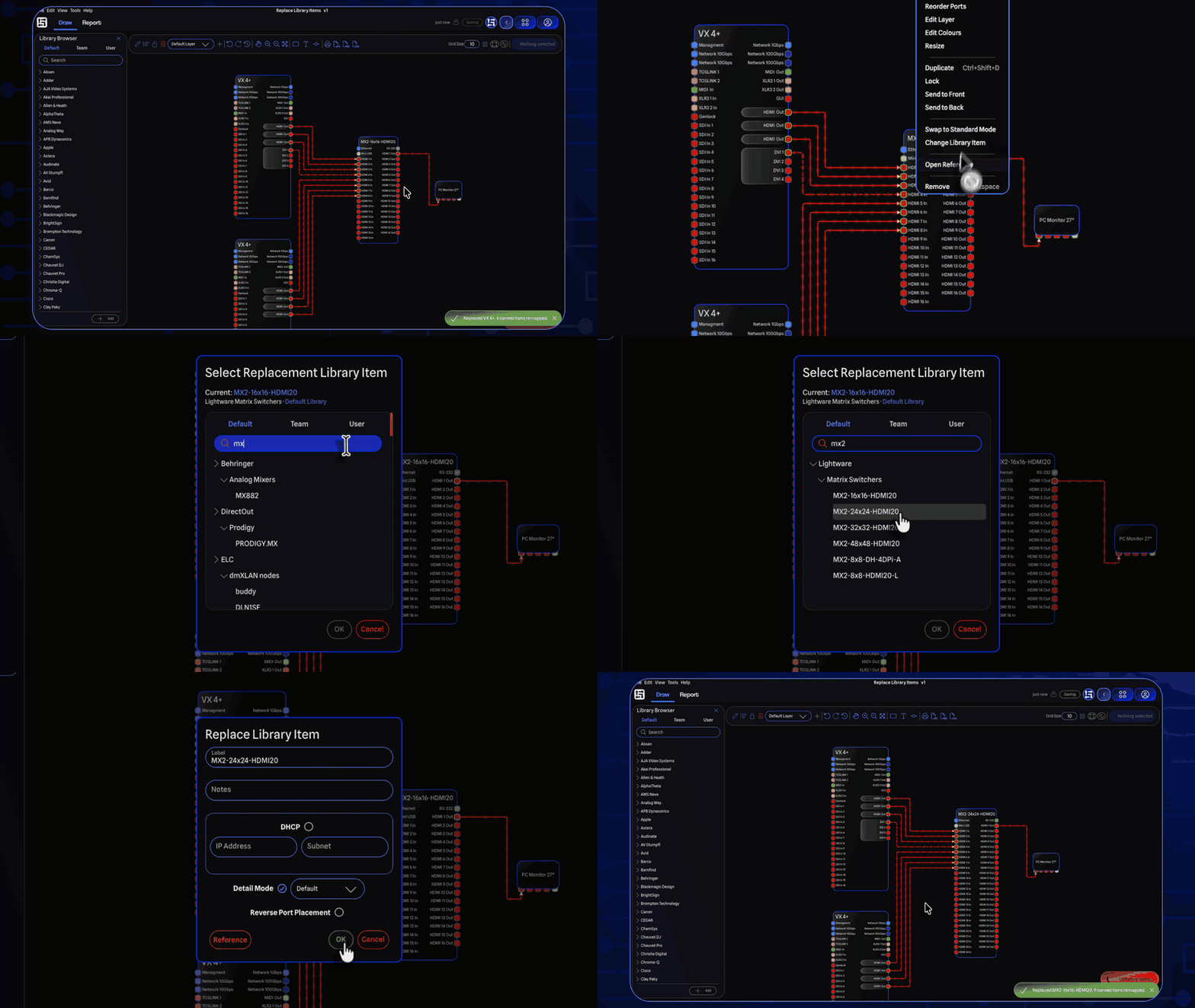
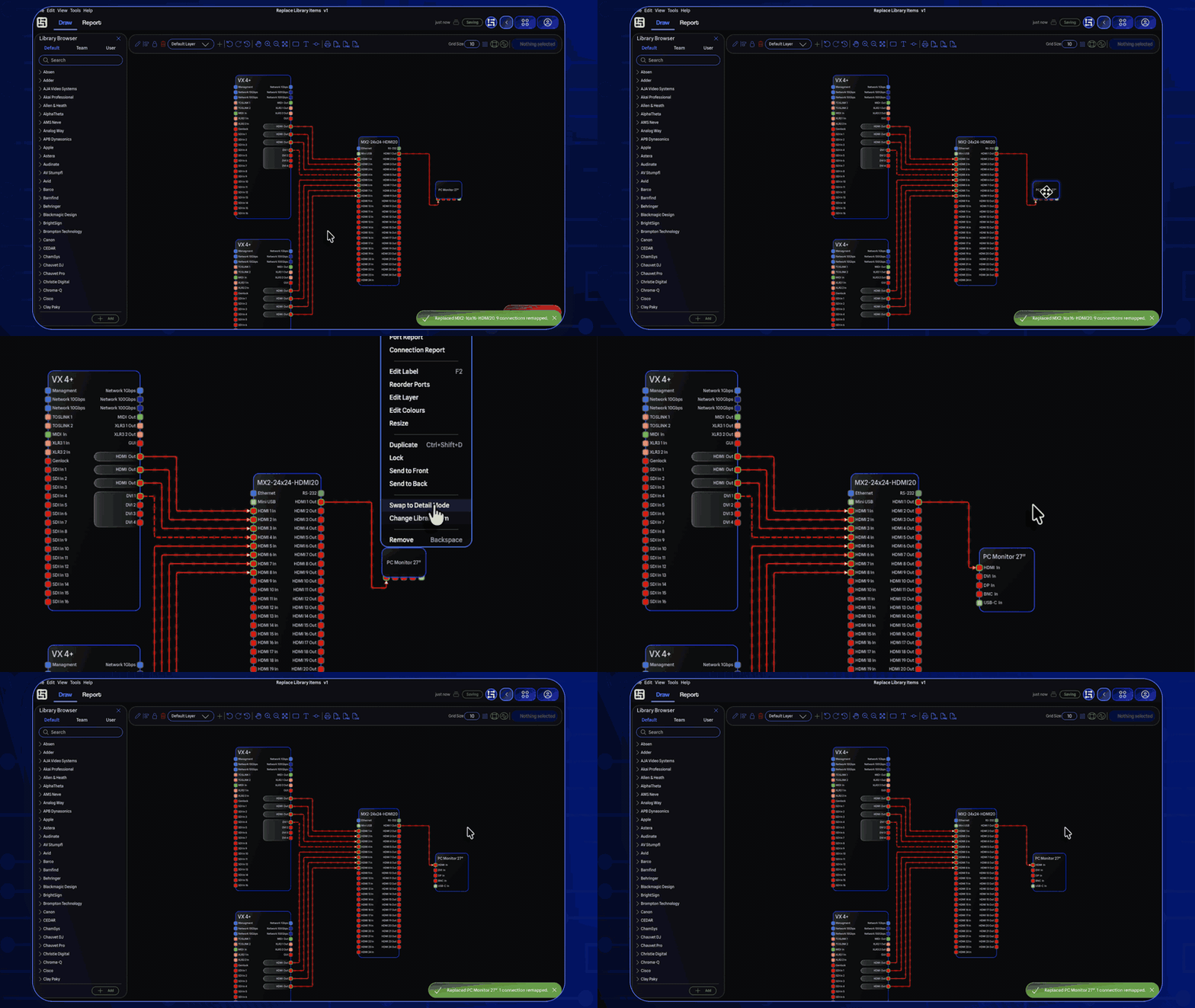
All the features from recent Beta releases are now fully available! This release lets you change a placed gear item's library entry and expansion cards without redrawing connections, adds custom connection line styles, makes the Library Browser and My Gear noticeably more responsive, and brings enhanced server sync alongside a new project repair flow that recovers missing data from your projects.
Swap Library Items and Expansion Cards
You can now swap a placed device for a different library item without removing it from the drawing. Right-click any gear and choose Change Library Item, and GearConnect remaps the existing connections to the matching ports on the new device. Gear preferences like Detail Mode and DMX modes are preserved during the swap, and expansion-card or base ports are preferred so cabling lines up the way you would expect.
For gear that supports expansion cards, Change Expansion Cards lets you edit slot configurations in place. The picker only shows card choices that fit the slots on the new device, so a swap can never leave a slot misconfigured.
You can now switch any placed gear between Detail Mode and Standard Mode without removing it. Right-click the gear and toggle the mode, or use the new Gear submenu in the main menu bar, making it much smoother when needing to swap between the two modes as GearConnect will re-map connections to the appropriate ports on the new mode automatically for you.
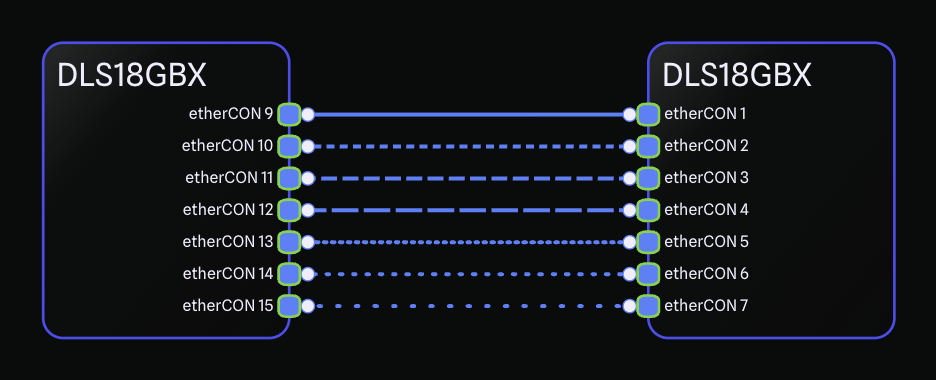
Connections can now be drawn in seven styles: Solid, Short Dash, Medium Dash, Long Dash, Short Dotted, Medium Dotted, and Long Dotted. The default Auto setting keeps the previous behaviour, drawing solid lines unless an adapter or signal warning triggers automatic dashing. A manual selection always overrides the automatic style.
You can change the style by right-clicking a connection or by using the Selection Toolbar when several connections are selected.
With thousands of items now in the Default Library, the search experience in the Library Browser and My Gear has been significantly improved. Typing in the search bar is responsive again, with typing responding instantly, and searching only filters after you are done typing.
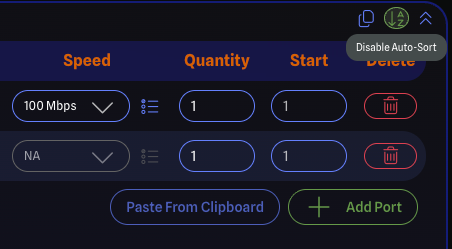
A new auto-sort toggle on the Port Config pane gives you control over automatic port sorting while you build out a library item. The auto-sort toggle and the regenerate preview setting are now both remembered between sessions, alongside your other Library Editor preferences.
In the rare case that your project file gets out of sync with the server, GearConnect can now repair it for you. When validation finds an affected item it tells you which item is impacted and lets you choose to attempt a repair, remove the item from the drawing, or close the project. Attempting a repair re-adds the item from the library and restores its connections where possible; if the original cannot be found, a generic item with a matching port count is used so the drawing stays intact.
In addition, project validation is no longer optional to ensure project integrity and runs automatically when an issue is detected, with a countdown bar to show when it is about to start.
Importing a project no longer aborts when errors are detected. The import continues and any issues are handled by the new repair flow. The previous strict behaviour is still available through an "Abort import on errors" checkbox in the file picker. Imports also pass through a new preprocessing step that catches common conflicts before the process begins.
A series of fixes makes Local Mode syncing more resilient when projects are imported, restored, or edited offline:
Reusing a VLAN ID in the same sync now keeps your chosen number instead of being reassigned.
Reusing a Cable Inventory SKU in the same sync no longer renames it to a variant like "1 (1)".
Restoring a previous version of a project no longer triggers a duplicate connection error during the next sync. Connections are now cleaned up and revalidated during file imports and version restores.
VLAN ID conflicts with stale server-side entries are detected and remapped automatically, and you are notified when it happens.
Cable SKU conflicts on the server are handled the same way, with automatic renaming and a notification.
Importing a project offline and then syncing it no longer crashes on VLAN references on switch ports.
The Hover Cards that appear over ports and connections now reposition themselves based on your cursor location. When your cursor is on the right side of the drawing, cards open to the left, and vice versa, so they no longer cover what you are looking at.
A new Gear submenu has been added to the Main Menu Bar so common gear actions are easier to find.
Promo codes that are restricted to first-time customers, or that conflict with an existing subscription, now show a clear, specific error message instead of a generic one.
Local Mode now handles errors more consistently across sync, import, and validation flows.
Bug Fixes
Fixed an issue where archived expansion cards could still appear in selection dropdowns.
Fixed the empty spacing between expansion card ports being connectable, which could leave orphaned connections.
Fixed a crash when adding a lighting fixture without a DMX profile or an amplifier without power options. These fields now display NA in the General Settings pane and are no longer editable when they do not apply.
Fixed Library Editor settings being reset when navigating between pages.
Fixed generic ports not showing accurate informational details, including adapter data and VLAN warnings.
Fixed two same-direction generic ports failing to connect.
Fixed the project upgrade notification appearing multiple times when opening older projects.
Fixed undo history not being available immediately after importing a project.